Start exploring.
Hold a chord and listen as the chain moves forward. RATE sets the speed; SYSTEM and RELATION set what the device may choose.
Chance opens possibilities.
You choose the kind of connection.
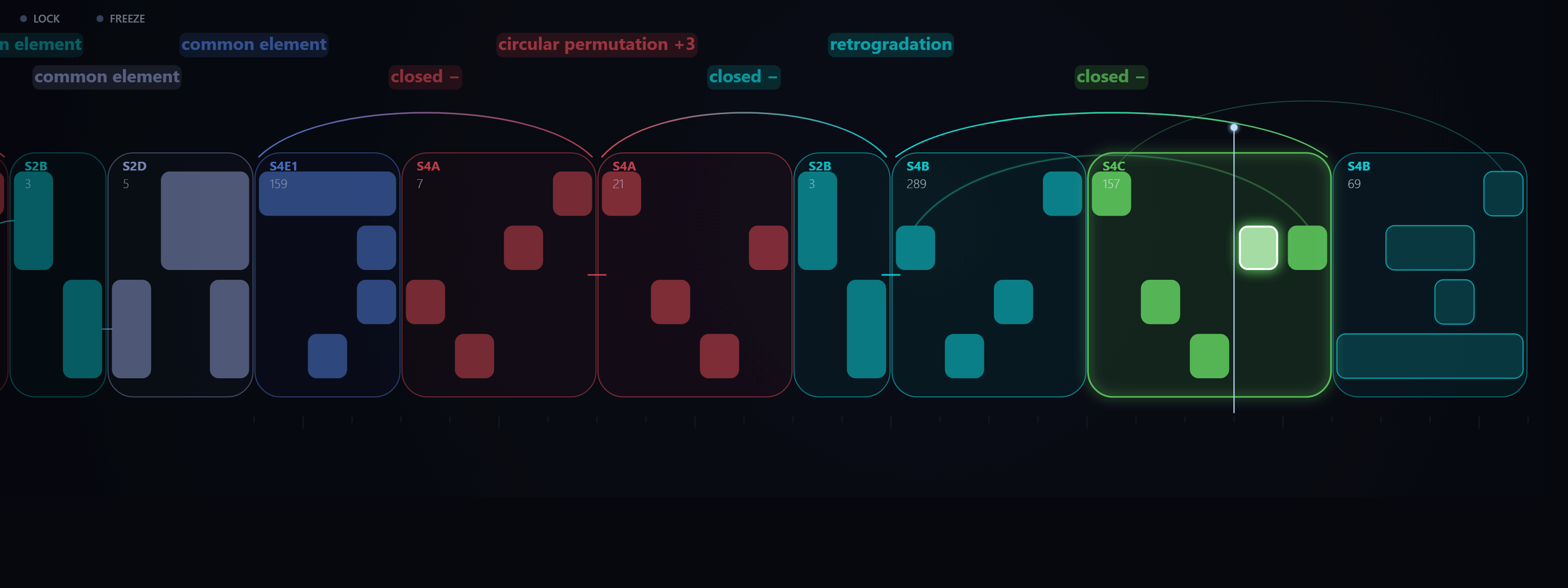
Turn the notes you play into musical figures. The device calculates and names their relations; you choose what to explore, what to repeat and what to keep.
Hold a chord. The device turns it into short figures and uses musical relations to choose what may follow. The display names the relation it used and draws how the notes correspond. Choose a kind of connection, then compare it with random, which does not require one.
With Live’s transport running, these notes become the material for the figures. Your instrument provides the sound.
Set SYSTEM to B and RELATION to inversion. Listen for a figure’s pitch contour turning upside down, and follow the named relations on the display.
Keep the notes and instrument, and remove the relation constraint. Listen for the difference before deciding what to keep.
A listening exercise for the device; recording pending. If a design has no successor under the selected relation, the device may fall back to random. The display identifies the connection actually used.
A design is an ordered shape: low, then high, then middle. It uses positions, rather than fixed pitches, so the same idea can follow a new chord. A system sets the rules for placing those sounds in time.
Hold a chord and listen as the chain moves forward. RATE sets the speed; SYSTEM and RELATION set what the device may choose.
Turn on PHRASE to build a new loop of 2–16 beats with the same rules, aligned to Live’s bars. Mark a slot F, S or D, then use RENEW to rebuild around what you kept at the next loop. CANCEL withdraws the pending change.
Hear each candidate in the loop before accepting it. The arrows offer possible successors, most similar first, with endings grouped as closed or open. ACCEPT keeps a design, = repeats the last one, UNDO takes it back, and DONE finishes.
Use + TO CLIP to keep a phrase in SEQ. Build a set of ideas, then choose which one comes next.
SEQ slots are saved with your Live set. Click a slot’s name to open its phrase in the lab for editing; its play button launches it.
Map each slot to a pad and choose Trigger or Toggle for a Session-style way of moving between phrases.
By default, a new SEQ waits for the phrase currently playing to finish. You can switch to Live’s global quantization instead.
SEQ slots belong to the device. To keep a performance as MIDI in Live, record the output on another track.
The main view follows the musical figures. SEQ keeps phrases within reach.



These images were rendered from the device’s actual interface code, using its engine. They are development views, not screenshots captured inside Ableton Live. The input is C–E–G–B, with SYSTEM set to all and RELATION set to any. Details are cropped for readability. These views use a development build from 30 September 2026 (7417431), identified in the supplied product audit. That build had not yet been heard in Live at the time of the audit. These views document work in progress; the release interface may differ.
Place it on a MIDI track, before an instrument. It follows Live’s transport; launching a SEQ while Live is stopped starts playback. Hold 2–5 notes, or use SPLIT and ORDER for larger chords of up to 10 notes in groups that take turns.
RELATION sets the connection to explore: common elem., closure, transposition, inversion, retrogradation, retro. inversion or circ. permutation. any draws among relations enabled in SETTINGS; random requires none. A design with no successor under the selected relation may fall back to random. The display names the relation actually used; closure appears as “closed +” or “closed −”.
Relations are evaluated within a line. At the turn of a loop, the last design meets the first again. This return is described rather than chosen: if no relation holds there, the display says free. Group boundaries are not labelled free.
No. SEQ slots live inside the device and are saved with your set. + TO CLIP stores a phrase in a SEQ slot. To keep what it plays as MIDI in Live, record its output on another MIDI track.
A system defines rules for organising sounds in time. A design is a particular figure. A relation connects figures. Designs use positions mapped to your input notes, rather than fixed pitches.
Yes. A design stores positions, so it carries on with the new notes. Changing how many notes you hold starts a new design.
The public manual will accompany the release. For questions about the project, contact Soft Axiom.
Based on Federico Wiman’s Formal Systems theory and the relations between its systems.
Instrument design and development by Soft Axiom.